
AI Recruitment Video Generator
Use a clear, front-facing photo with visible eyes, a complete jawline, and an unobstructed mouth.
State the role, why it matters, the real work, required experience, employee value proposition, location or work model, and one clear application step.
What is an AI Recruitment Video Generator?
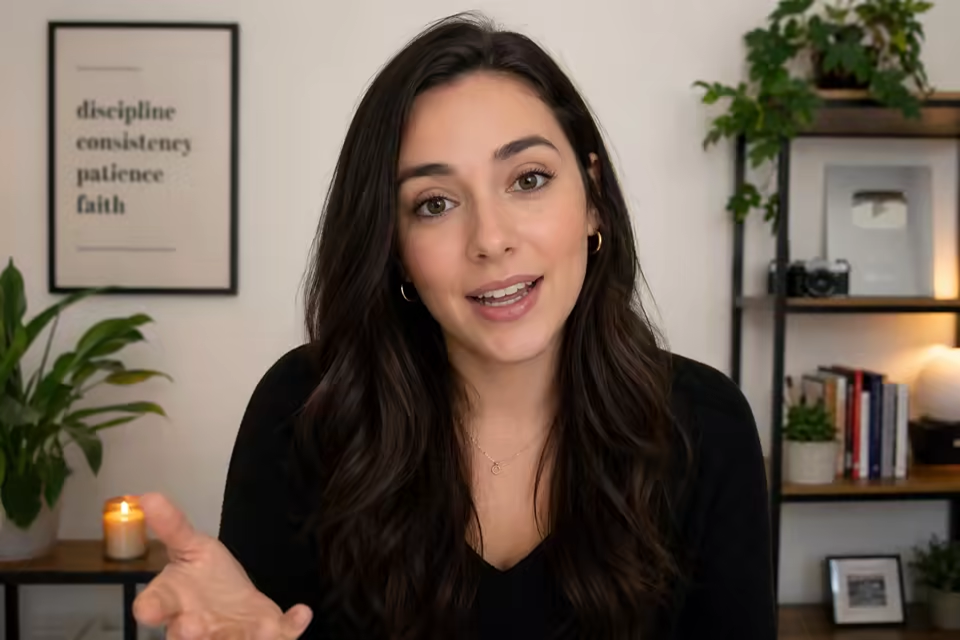
An AI Recruitment Video Generator combines a recruiter or hiring manager portrait with a job script or voice recording to create a talking recruitment video. Use Text when the wording changes for each open role, or use Audio when the speaker’s delivery, pacing, pronunciation, and emphasis matter. The downloadable result can introduce a job, explain the team, clarify expectations, present the employee value proposition, and give candidates one next step.
Use the generated presenter segment as the anchor for a complete employer-brand video. Combine it with role cards, captions, logos, team footage, benefits, workplace highlights, and a direct application link in your editor.
What You Can Create with an AI Recruitment Video Generator
The AI Recruitment Video Generator helps talent teams turn the role information candidates care about into a direct, personable presenter video.
Turn a Recruiter Photo and Script into a Recruitment Video
Upload a clear portrait of yourself, a recruiter, talent lead, founder, or hiring manager. Add the role script and select an available voice and language, or upload a voice recording. The AI Recruitment Video Generator produces a focused talking-presenter take that can be updated for another role without arranging a new camera, studio, or recording session every time.

Create a Job Vacancy Video for Each Open Role
Use the AI Recruitment Video Generator as a job vacancy video maker for one position at a time. Open with the role and why it matters, describe the work and team context, state essential requirements, explain the location or work model, and close with a direct application step. A role-specific recruitment video gives candidates a much clearer reason to keep watching and apply.

Explain the Employer Value Proposition in Plain Language
Turn your mission, growth opportunities, learning culture, flexibility, benefits, leadership, collaboration, and employee experience into a concise employer-branding segment. A focused script helps candidates quickly understand what makes the team and opportunity distinctive.

Let the Hiring Manager Set Real Role Expectations
Use a hiring-manager portrait and script to explain the team goal, reporting relationship, daily collaboration, first priorities, decision scope, and definition of success. Create a consistent hiring-manager overview for career pages, candidate emails, and social posts without repeating the same recording session.

Create Localized Recruitment Takes without Refilming
Prepare a script in the target language, then select a matching available voice or upload a local-language recording. Reuse the same presenter image for regional hiring messages without filming every language version, while adapting role details, benefits, location, and application instructions for each audience.

Prepare Hiring Videos for LinkedIn and Career Pages
Download the presenter segment for LinkedIn, a career page, a job listing, candidate outreach, or a recruiting campaign. Add captions, readable role and location cards, company branding, an application URL, and office or team footage, then reframe the finished edit for each placement.
How to Use the AI Recruitment Video Generator
The AI Recruitment Video Generator turns a clear portrait and role-specific message into a polished presenter video in three simple steps.
Upload a recruiter photo
Choose a clear front-facing portrait with visible eyes, a complete jawline, and an unobstructed mouth for natural presenter motion.
Add a script or voice recording
Enter the role, responsibilities, requirements, employee value proposition, location, and application step, or upload a clear MP3, WAV, or M4A speaker recording.
Generate, polish, and publish
Render the presenter take, choose your favorite result, then add captions, branding, role cards, supporting footage, and the final application link.
AI Recruitment Video Generator Use Cases
Use the AI Recruitment Video Generator for hiring messages where a recognizable presenter and role-specific script can reduce repeated filming.
Job opening announcement
Introduce one open role, why it exists, who it helps, the most important work, essential qualifications, location or work model, and one direct application path.
Hiring-manager role overview
Let a manager explain the team objective, responsibilities, collaboration style, first priorities, and what success should look like.
Career-page recruiter introduction
Create a warm recruiter introduction for a career page, then place it beside accurate company information, real employee stories, open jobs, and accessibility support.
Social recruiting campaign
Prepare concise presenter takes for hard-to-fill roles, hiring events, regional openings, referral campaigns, or deadline reminders, then finish each channel edit with captions and a clear CTA.
Why Choose Our AI Recruitment Video Generator?
The AI Recruitment Video Generator focuses on a controllable presenter workflow: a recognizable speaker, a role-specific message, practical quality controls, and a downloadable result.
Put a recognizable company representative on screen
Feature a recruiter, founder, talent lead, or hiring manager who can give the opportunity a clear and memorable human presence.
Control the exact recruitment message
Write the exact message you want candidates to hear or use the speaker’s own audio to preserve their delivery and emphasis.
Reuse the presenter across open roles
Keep one portrait and production approach while changing the role-specific script, language, call to action, and final supporting footage.
Review quality and cost before publishing
Choose available voice, language, and 720p or 1080p controls, see the credit estimate, inspect the complete take, and download the rendered MP4 for final editing.
AI Recruitment Video Generator FAQ
What is an AI Recruitment Video Generator?
Can I paste a job description into the AI Recruitment Video Generator?
Can I use a photo of our recruiter or hiring manager?
Can I upload the recruiter’s real voice?
Can the AI Recruitment Video Generator create an employer branding video?
Does it add captions, logos, job cards, office footage, and a call to action?
Can I reuse the same recruiter for multiple roles or languages?
Can I publish the video on LinkedIn, a career page, or a job board?
How do I make the recruitment video more engaging?
Is the AI Recruitment Video Generator free?
More tools in AI Talking Avatar Generator
Compare other focused workflows in the same AI Talking Avatar Generator collection.
View AI Talking Avatar Generator
AI Spokesperson Video Generator
Turn an approved portrait and reviewed business script or audio into a lip-synced presenter video for introductions, welcomes, and updates.
Open tool
AI UGC Avatar Generator
AI UGC Avatar Generator turns one creator photo and an ad script or voice recording into a lip-synced UGC-style video for TikTok, Reels, and Meta ads.
Open tool
AI Avatar for Course Creators
AI Avatar for Course Creators turns an instructor photo and lesson script or voice recording into course welcomes, module intros, updates, and teaching clips.
Open tool
AI Avatar for Real Estate Agents
Create an AI avatar for real estate agents from one headshot and script. Make market updates, introductions, listing announcements, open-house invites, and FAQ videos.
Open toolCreate a Hiring Video with the AI Recruitment Video Generator
Start with one recruiter or hiring manager portrait and one role-specific script, then create a clear presenter video for your next hiring campaign.